About
Texas FFA now allows districts and areas to create and manage their own events through the Texas FFA Event Registration System. Charges from these events will be billed to a chapter’s district or area account balance, similar to district and area dues. Payment information can be specified for each event. There is no fee for districts and areas to use this registration system and is provided by the Texas FFA Association.
The new district/area credit card payment options will also allow a chapter to pay their event registration fees by credit card if a district/area has opted into having credit card payments available.
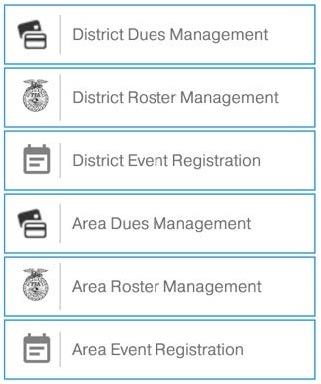
This functionality is now live and available to district and area account managers (coordinators, treasurers, etc.) who already have access to Texas FFA District/Area Roster and Dues Management. This new functionality is found in your left-side menu along with the existing Dues and Roster Management link.
If a new or additional advisor needs to be added to the District/Area account for creating and/or managing events that does not currently have access to the Dues/Roster Management screens, please contact Gwenn Cain (gwenn@texasffa.org) and permission will be given to whoever is allowed by the district and/or area. |
|
 |
|
Event Setup
 |
|
OPEN/CLOSE:
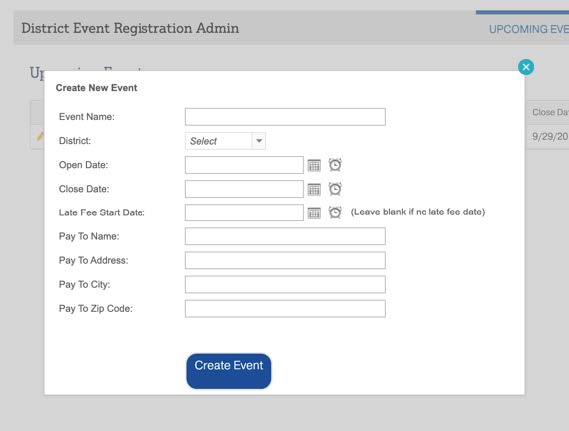
Events can be setup to open and close at certain dates/times with a separate late fee start date per event.
PAYMENT INFO:
Payment information can also be specified per event and does NOT have to be the same address as your district/area dues.
RESTRICT ACCESS:
If the new event is a district event, access can be restricted to only a certain district; area events are available to all chapters in an area. |
 |
|
ADD LINE ITEMS TO COLLECT NECESSARY DATA:
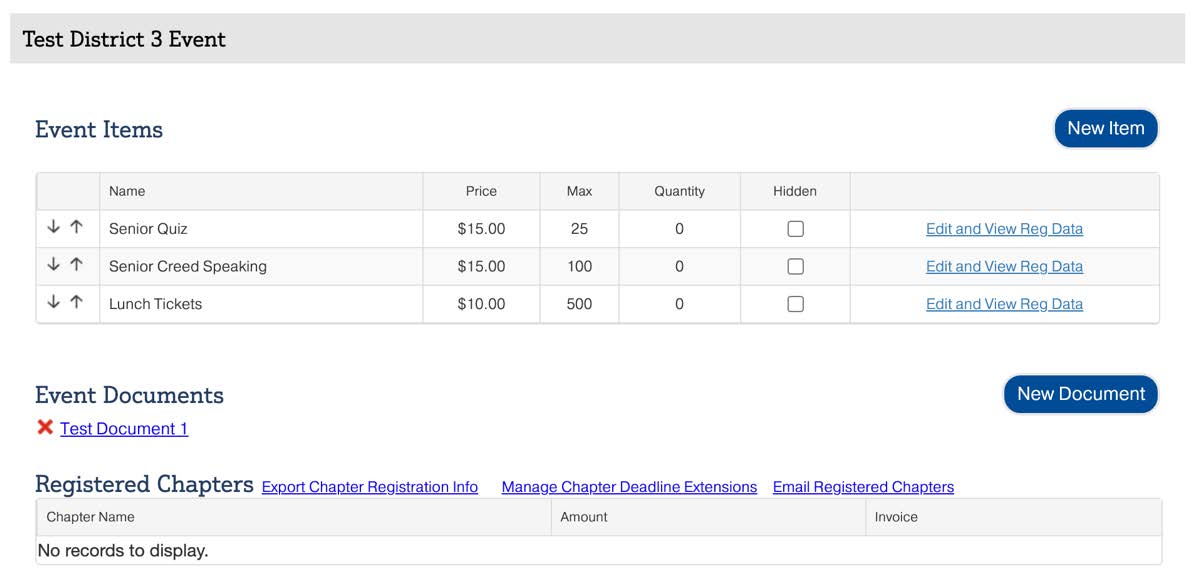
Events can be created with a variety of line-item types, depending type of registration data needed. Line items can be hidden from chapters when they are full, no longer available, or to allow setting up the line item by the event admin before making it available to chapters.
EVENT DOCUMENTS:
Event documents can also be uploaded for chapters to view and download when registering. |
|
Deadline Extensions & Email Communication
 |
|
DEADLINE EXTENSION:
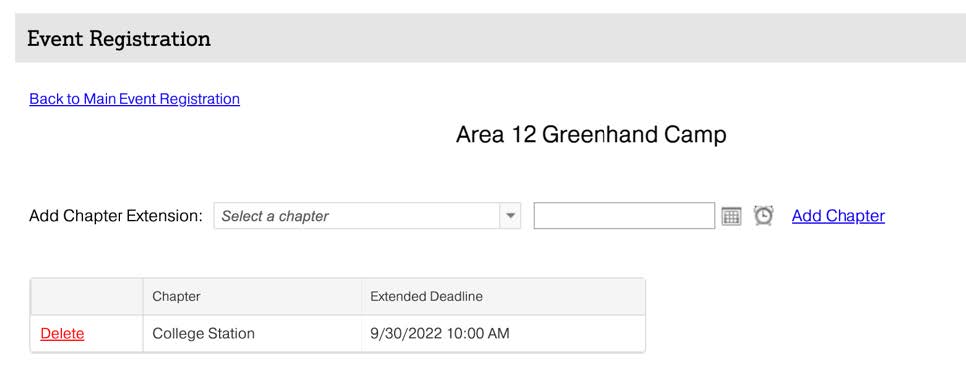
Individual chapters can be granted registration deadline extensions. These extensions override the overall event registration deadline and can be used if a chapter misses the overall deadline and the event admin wants to allow them to register or make changes to their registration without reopening the event for everyone. |
 |
|
EMAIL REGISTERED CHAPTERS:
Event admins have the ability to email all advisors at chapters registered for an event. This will be sent “from” the event admin’s name and allow recipients to reply back directly to your email with any questions. An attachment is also allowed. |
|
Registration Line Item Types and Descriptions
NUMBER BLANK: (i.e. Numeric text box)
- A chapter specifies a specific number and is charged a price per count (Ex: Lunch tickets, student counts with names, parking passes, etc.)
- An overall line item max and max per chapter can be specified.
FILE UPLOAD:
Accept various file-types via event registration system for things like Liability Waivers, signed forms, manuscripts, video files, etc. Administrators are then able to view uploaded files by chapter or download all submitted files into a single .Zip download file. File formats can include:
- Documents - PDF, DOC, DOCX, PPT, PPTX, XLS, etc.
- Photos - JPG, JPEG, GIF, etc.
- Videos - MP4, MOV, etc.
- Audio - MP3
STUDENTS FROM ROSTER: (Drop-down list)
All student line items include the option to require t-shirt size, set a max per chapter and a max per line item. Three options include:
- Ignore Membership – This will just show the complete list of students listed on a chapter’s Students page in Texas FFA Roster. Students do not need to be submitted for current year membership to show in this registration type.
- Current Year Members – This will show the list of current year submitted FFA members for a chapter. This line item can be used to ensure only submitted and verified FFA members are registered for an event.
- Current Year Members with State Waiver – This will show the list of current year submitted FFA members for a chapter that have also completed the annual Texas FFA liability waiver (student and parent signed). This line item can be used to ensure only submitted and verified FFA members are registered for an event and also have a current liability waiver.
ADVISORS FROM ROSTER: (Drop-down list)
Registered advisors will be charged the item price per advisor registered. Two options include:
- Advisors from Roster – All active advisors at a chapter will be listed in the drop-down list.
- Advisors From Roster WITH State Waiver – All active advisors at a chapter that have also completed the annual Texas FFA advisor liability waiver.
TEAMS w/ 3 MEMBERS, TEAMS w/ 4 MEMBERS:
Each “Team” is charged per team, regardless of the number of student registered (up to 3 or 4). Three options include:
- Current Year Members (Drop-down list) -- This will show the list of current year submitted FFA members for a chapter. This line item can be used to ensure only submitted and verified FFA members are registered for an event.
- Current Year Members with State Waiver (Drop-down list) -- This will show the list of current year submitted FFA members for a chapter that have also completed the annual Texas FFA liability waiver (student and parent signed). This line item can be used to ensure only submitted and verified FFA members are registered for an event and also have a current liability waiver.
- Type Name (Text Box) -- A student’s First Name and Last Name can be typed for either 3 or 4 member teams.
|
Reviewing Registrations and Reports
Several different reports can be generated from a registration, including both overall event reports and individual line
item reports.
CHAPTER INVOICES:
All chapters registered are shown to event admins with the ability to generate the PDF invoice
for each chapter registered. This PDF invoice includes chapters event charges, payment
information, and all registration data (registered advisor and student names per line item,
charges per line item, etc.).
CHAPTER REGISTRATION INFO TO EXCEL:
This report is an event summary report that shows a list of all chapters registered for the
event, the number registered for each line item by each chapter, the total chapter charge,
chapter advisor names and email addresses.
LINE ITEM REPORTS:
- Export Registered Student, Advisor and Team Member Names -- In each line item, you can generate a report all of student names, advisor names, or team member names registered for that particular line item. Information will include
the chapter name, first name, last name, email address, t-shirt size (if required), and cell
phone number (advisors only)
- Export Chapter Info to Excel -- In each line item, you can generate an unduplicated report of any chapters registered in
that particular line item. This report will include the chapter names, advisor contact
information (advisor names, emails, and cell phone number) and the number of
people/units registered for that line item by each chapter. This report is helpful for
events like LDEs in which you might have a line item for each contest type and not all
chapters register for every contest. This will allow you to export the advisor contact
information of only the chapters who registered for that line item.
|
Questions?
Questions about setting up your first event or looking for guidance on the best way to set up your event?
Please contact Gwenn Cain with Texas FFA at gwenn@texasffa.org.
|